Networking
Networking
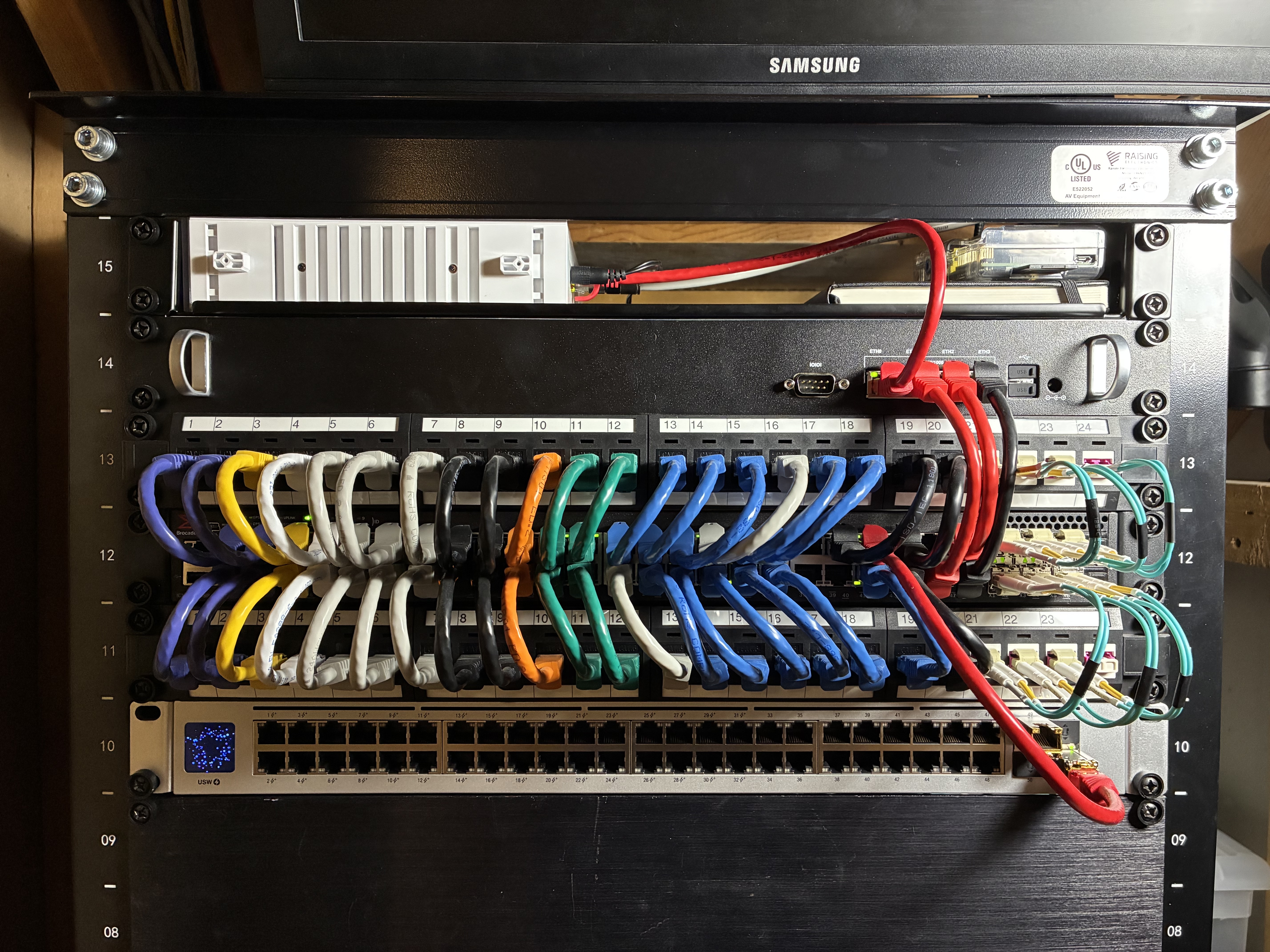
Starting at the top of the rack, we first encounter the networking devices. Here’s a little diagram of how the flow works
      flowchart LR
    A(Modem) --> B(Firewall)
    B --> C{Switch}
    C --> D{Unifi U7 InWall}
    C --> E{Unifi U7 Lite}
    C --> J(Wired Clients)
    C --> H(10GbE Clients)
    D --> F(Wired Clients)
    D --> G(WiFi Clients)
    E --> I(WiFi Clients)
Below is a detailed explaination of each device’s purpose and role.
Internet
Internet is provided by an Xfinity 300/100 Cable connection. I’m not a fan of renting the ISP’s equipment, so we went with a Hitron CODA56 DOCSIS 3.1 ($120) cable modem.
The cable modem is connected via 1GB ethernet to the WAN port of the firewall.
Firewall
The firewall is a bit of a custom box that will be hard to replicate. The main board is a PC Engines APU4d4 ($168) that unfortunately, isn’t being made anymore. The PC Engines boards are a great value and really fun to work with.
The APU board is stuffed into a varia-store 1U case ($80?) that I’m not even sure how much I paid for. The site is in German (I can’t speak German) and was interesting to use their configurator to order the proper parts (case, powersupply, etc.), but it all works perfectly.
All of this gear is running pfSense though I will be migrating to opnSense sometime in the future.
I won’t detail out any configuration but some of the technologies running on the firewall are:
- DNS
- VLANs
- DHCP
- Firewall Rules (some scheduled)
- NAT
- IPsec site-to-site VPNs (for the offsite connections)
- WireGuard VPNs (for clients)
The LAN side ports are all connected to the switches via 1GB ethernet.
Switching
Switching is handled by a number of devices.
| Make | Model | Price | Purpose |
|---|---|---|---|
| Brocade | ICX7250-48P-2X10G | ~$100 eBay | Main Switch |
| Ubiquiti | Unifi Switch 48 POE | ~$600 | Not Used |
| Ubiquiti | Unifi Flex Mini | $30 | Office |
| Ubiquiti | Unifi Flex Mini | $30 | Main TV |
Brocade ICX7250-48P-2x10G
The Brocade is awesome. There’s a solid write up on Serve The Home which details out the features of a number of Brocade switches. I chose the ICX7250-48P-2x10G for the following reasons:
- 48 POE+ gigabit ports
- 8x 10GbE ports (for compute nodes and storage)
- Low cost
- Modifiable (replacement fans)
- Layer 3 routing
It’s cool to get all of those features in a single low-cost device and not having to split up the duties to multiple expensive pieces of hardware. Yes, it introduces a single point of failure, but enterprise grade switches tend to be pretty bullet proof and this is an area I’m willing to risk fault tolerance.
The one big downside for me is that the standard fans are very loud. I have a project lined up to replace the fans and may document that here.
Ubiquiti Unifi Switch 48 POE
This switch is great, but it’s not currently in use. It’s hard to get rid of it because I’m still debating how to put it back in the lineup. It’s relatively low cost, has 48 gigabit (32 are POE+) ports, and is fanless!
Ubiquiti Unifi Flex Mini
These things are awesome. For $30 you get five managed gigabit ports. One port is an uplink port, and allows you to power the whole switch with POE+! I have one in my office, and one behind our main TV. Each of the ports are configurable through the Unifi Network Controller Application. So, you can toggle VLANS, rename ports, all that right through the web app, or mobile app.
WiFi
Again, we have a few devices used for WiFi coverage.
| Make | Model | Price | Purpose |
|---|---|---|---|
| Ubiquiti | Unifi U7 InWall | $150 | Main Bedroom |
| Ubiquiti | Unifi U7 Lite | $100 | Basement |
The U7 InWall is cool because it provides both WiFi and Wired connectivity options. I use it as both a WiFi access point, and to provide wired connections to the media devices in our Main bedroom. Again, it has a POE passthrough port, so you can power one external POE device too. I like POE.
Patch Panels
To help keep the cabling tidy, we have two path panels in the rack, and one overhead. The overhead path panel is the termination point for all drops running through the house. Each room has at least two drops. Some rooms have more drops (for TVs, gaming consoles, etc.).